
You've opened an old WhatsApp thread and found a phrase you'd forgotten, a running joke, a familiar way of saying goodnight. You're curious whether an AI chat could capture that style, but you don't want it inventing memories or pretending someone is there.
Creating a persona starts with choosing what to represent and what to leave out. A useful setup combines permitted messages, selected memories, clear boundaries, and a review before you chat. Just as important, you should be able to trace a detail to its source and remove it when permission changes.
Table of Contents
- What Creating a Persona Gives You
- How the Persona Builder Walks You Through It
- Boundaries and Approvals Before the First Reply
- How to Choose and Label Your Source Files
- Memories You Can Correct Pause or Delete
- Build the Avatar and Open a Private First Chat
- Questions to Settle Before You Create One
What Creating a Persona Gives You
A persona gives you a private conversation shaped by familiar language and relationship context. It generates replies in a style, not the person behind that style. Choose your starting point by what you want the conversation to help you do, rather than how convincing you hope it will sound.
Persona starting points and hard limits
| Starting point | What replies may do | Never claim | Permission bar |
|---|---|---|---|
| Former partner | Continue familiar tone from permitted history | That this is them or that it can contact them | Only chats you have the right to use; do not impersonate them to others |
| Someone you lost | Reflect on authorized shared stories | That they are back or that this replaces grief support | Authorized archive, with privacy for living people in those files |
| Best friend | Keep shared humor and recurring phrases | That the friend is speaking or endorsing the chat | Permission for a realistic living-person likeness |
| Yourself | Mirror your writing style with editable memory | That it is a professional adviser or always correct | Your own material, which you can correct or delete |
| Original character | Invent a private voice with no copied identity | That a real private person is behind it | No one else's likeness or private messages |
Choose an outcome you can evaluate
For a persona based on yourself, a useful outcome might be drafting a friendly message that sounds less formal. For a friend-inspired persona, it might be preserving playful sentence fragments and a recurring joke, with that friend's permission.
A former-partner persona requires a distinct boundary: familiar conversation without contact, reconciliation promises, or claims about what the individual currently feels. A memorial persona can support reflection on authorized stories, but it isn't grief counseling or therapy.
At ExChat, we create a structured AI representation from permitted material, including messages, photos, voice notes, memories, and relationship details you choose. The persona stays private by default and visibly labeled AI. It isn't conscious, isn't that individual, and can be wrong.
Familiarity isn't authorization
The FTC's explanation of its government-and-business impersonation rule describes materially false impersonation and false claims of affiliation, endorsement, or sponsorship as deceptive practices within that rule's scope. It's not a general rule about every personal AI scenario, but the practical boundary is useful: don't use convincing language to mislead someone about who's speaking.
A successful persona sounds appropriately familiar while staying unmistakably artificial.
You can also choose an original character. That gives you room to invent a voice without copying a real person's private identity or borrowing messages you don't have permission to use.
How the Persona Builder Walks You Through It
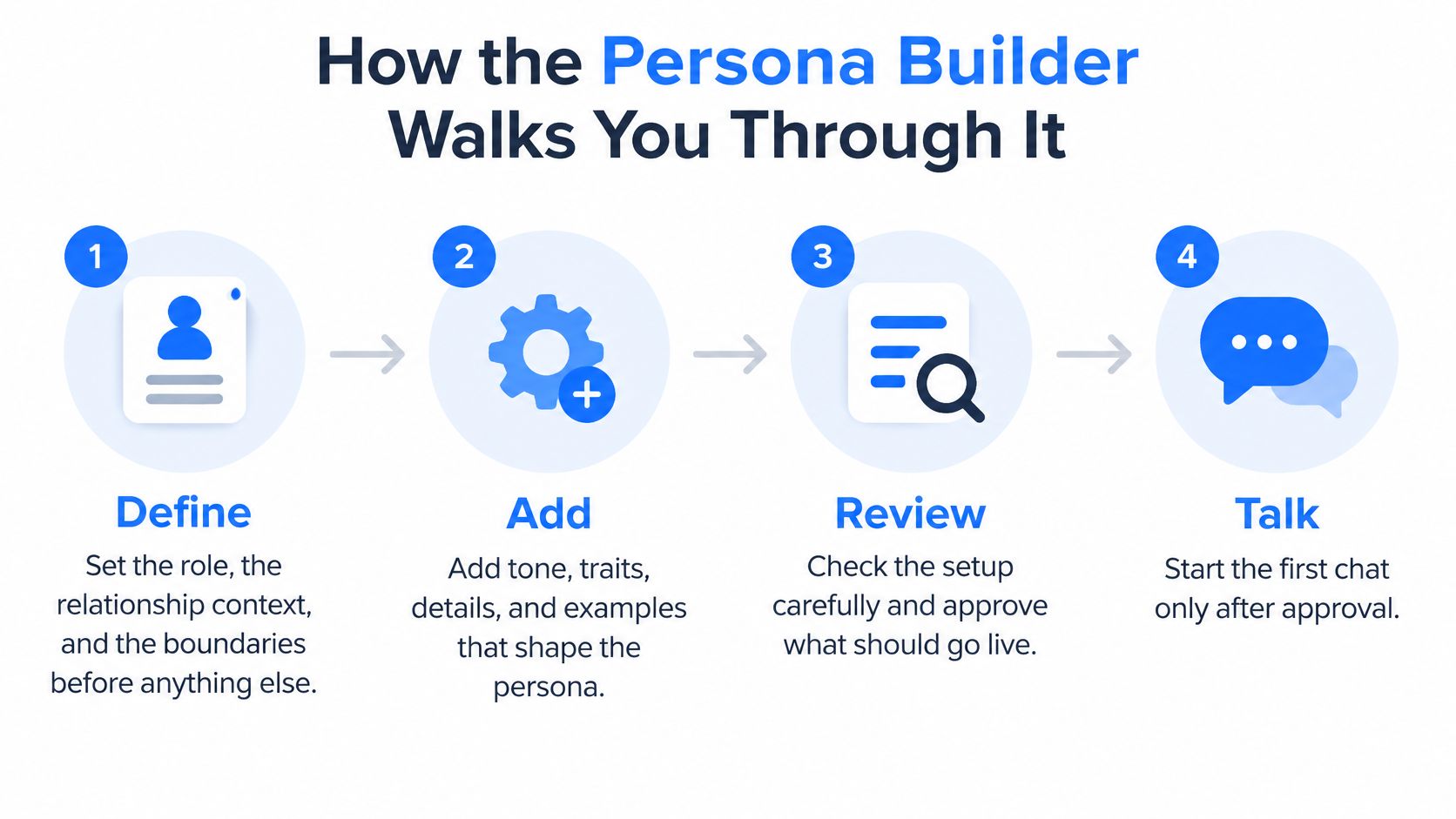
Our Persona Builder follows Define, Add, Review, and Talk. In broad terms, you upload permitted material, review the persona, and begin a private AI-labeled chat. Define comes first so you know what you're asking the material to support.
Use this flow as a set of approval checks, not a race to the chat screen.
Define and add with a purpose
Define the role, relationship, voice, and limits.
Start with a plain description of what the conversation is for. A digital twin for drafting casual messages needs different knowledge from a memorial persona for reflecting on family stories.Specify vocabulary, sentence length, humor, and recurring phrases. Instead of merely choosing “warm,” describe a voice that uses short sentences, gentle teasing, and practical encouragement. Then identify topics to decline, facts never to invent, and behaviors never to perform.
Before moving on: Check that the purpose describes an AI conversation, not a replacement relationship or a way to speak for someone else.
Add material that supports that purpose.
Choose authorized chat exports, photos, voice notes, and memories you wrote. A short, relevant exchange can be more useful for defining humor than an unrelated archive full of logistics.
Label each item by source and context. Keep a memory you wrote distinguishable from a message someone sent, because those materials support different kinds of claims.
Before moving on: Make sure you can explain why each file belongs and whose permission it requires.
Review before you talk
Review what we learned before the persona is created.
Read the profile for biography, relationship context, tone, and boundaries. Watch for an interpretation presented as a fact, such as turning a sarcastic complaint about camping into a permanent dislike of travel.Test sample situations: a casual greeting, an uncertain memory, and a request outside the persona's boundaries. Reject invented life events even when the wording sounds convincing. Also check that no living person is being simulated without permission.
Before moving on: Approve only a profile you've read, with the AI label intact.
Talk after approval.
Begin privately and keep the initial conversation low stakes. Selected context can carry forward, so pay attention to what the persona treats as established knowledge rather than judging only whether the tone feels right.You can correct, pause, or delete the persona afterward. Approval is permission to begin testing in conversation, not proof that every future response will be accurate.
For a shorter process overview, see how the creation flow works. The useful habit is simple: finish each step with a check that the next step can rely on.
Boundaries and Approvals Before the First Reply
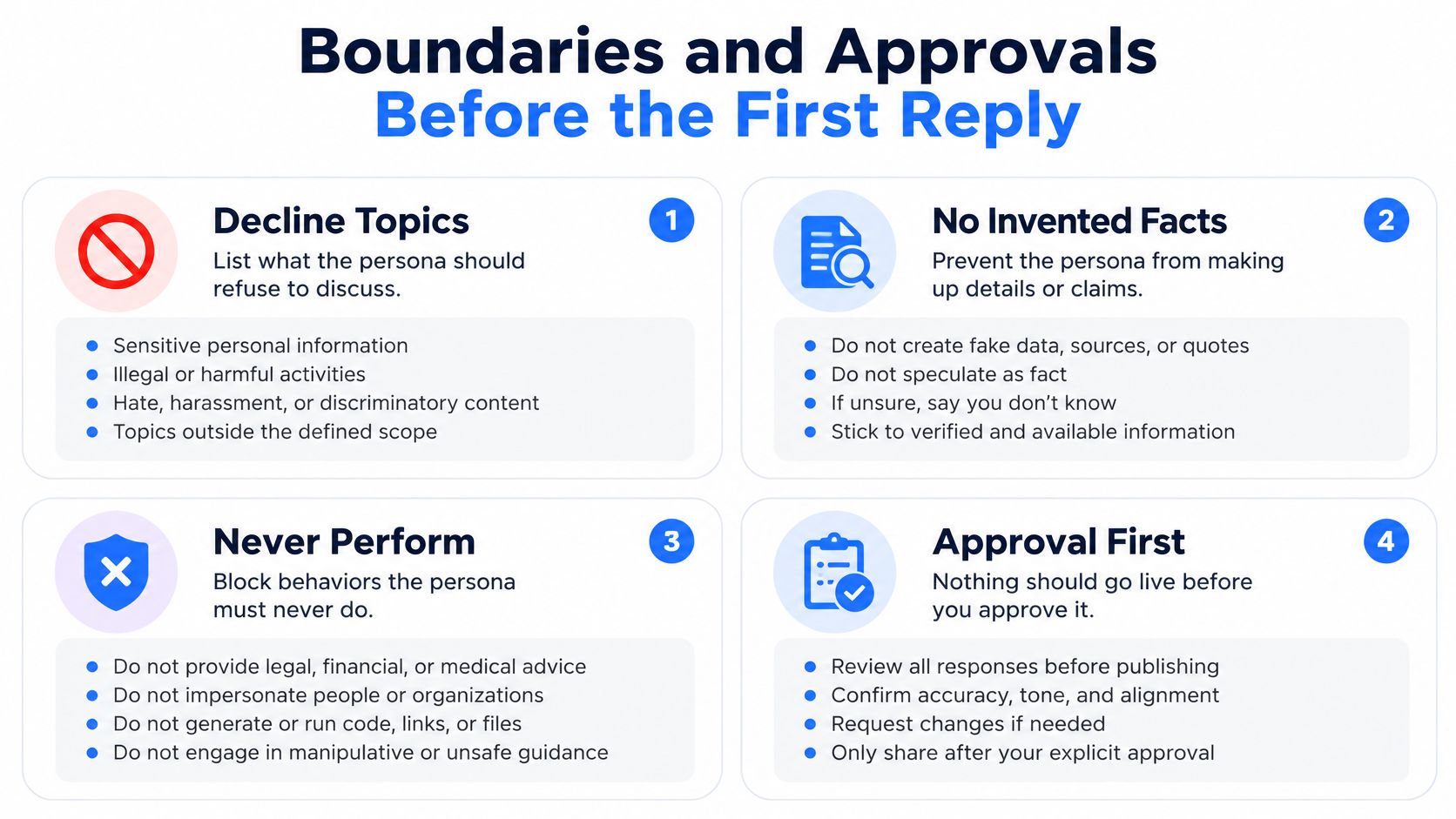
Write these fields before you admire the voice: topics to decline, facts never to invent, and behaviors never to perform. A persona that gets the humor right but fabricates a reunion or exposes someone else's private story hasn't passed review.
Make the boundaries concrete enough to test.
- Topics to decline: Private disputes involving uninvolved people, or requests for therapy, medical, or legal advice.
- Facts never to invent: Life events, present-day feelings, promises, diagnoses, and conversations absent from authorized material.
- Behaviors never to perform: Claiming to be the person, offering to contact them, or presenting generated text as their endorsement.
Keep the approval checklist beside those boundaries.
Consent needs a withdrawal plan
Having a message on your phone doesn't automatically give you permission to simulate everyone in it. For a realistic living-person likeness, get explicit permission and use authorized sources. Don't hand the resulting conversation to friends as though the person sent it.
Scholarship on post-mortem generative AI and digital legacy argues for consent that remains active throughout the persona's life cycle, including attention to living people represented in shared memories. Turn that principle into a permission record you can revisit.
Record who authorized each source, what use they agreed to, who else appears, and when you'll review that permission. For a memorial archive, also settle who may contribute, resolve disagreements, and request retirement of the persona.
Withdraw a source, then retest
Say a friend withdraws permission for a group conversation. Remove the source and the memories derived from it, then ask a sample question that previously drew on that thread. Check that the persona no longer uses the withdrawn detail, rather than assuming removal worked because the file disappeared.
Approval rule: A familiar answer doesn't pass if it relies on material you can no longer use.
Read our consent and likeness guidance before building a realistic likeness. Real-person and memorial personas remain visibly AI-generated, and their probabilistic replies can be incorrect, upsetting, or inconsistent. Boundaries help you manage those risks; they don't turn the persona into a person or professional adviser.
How to Choose and Label Your Source Files
Treat your upload as a curated folder, not a backup of your entire messaging life. Choose examples that show the voice, stories, and relationship context you want the persona to use.
Say a group thread contains a running joke you love, but another participant also discussed a private health problem. Don't upload the whole thread because the joke is useful. Leave out the file if a living participant hasn't agreed, or prepare a clearly separated, authorized excerpt that excludes their contributions and private information.
Start with the app you actually used
A WhatsApp-based persona makes sense when that's where the relevant conversations happened. The same principle applies to Telegram history and Instagram messages.
For SMS or mixed messaging archives, use the text-message persona guide. Before uploading, follow the guide to preparing a chat export for an AI persona so you can review the material deliberately.
Keep a source record alongside each item. These are practical labeling fields, not a reason to include information you'd otherwise leave out.
Label fields for each source
| Field | Example | Why it matters |
|---|---|---|
| App or source | WhatsApp export | Shows where a detail came from |
| People in the thread | You and one friend | Flags third parties who need permission |
| Rough dates | Before your move, not current | Keeps old habits from reading as current |
| Item type | Message, photo, voice note, or memory you wrote | Separates a provided message from a memory or inference |
| Permission status | Yours, or authorized by the living person | Lets you remove the source later |
Track permission person by person
For a shared file, don't stop at “permission received.” Record which person authorized which material and whether anyone else remains unapproved. If you can't separate an unapproved person's information cleanly, leave the file out.
The privacy tradeoff deserves that care: in its global consumer study, the Qualtrics XM Institute found 45% of consumers were comfortable with companies using purchase history for personalization, compared with 17% for social-media posts. Those findings concern commercial personalization, but they're a useful reminder not to treat personal conversations like routine shopping preferences.
Label your own recollections, too. A story you wrote from memory isn't a verbatim message, and a model inference isn't either kind of source. If you'd rather avoid private identity material altogether, an original character can have an invented voice without copying another person.
Memories You Can Correct Pause or Delete
Check the source cue before trusting a personal detail. Open the relevant memory, compare it with the response, and distinguish a provided message from an added recollection or model inference.
Don't treat an entire export as one undifferentiated instruction. A useful memory stays inspectable: what it says, where it came from, when it applied, and whether you still want it used.
When a persona reply goes wrong
| What you notice | Likely cause | What to change |
|---|---|---|
| A life event that was never in your files | A loose boundary or an inferred biography | Decline that topic and delete the unsupported memory |
| An old habit treated as current | Dated chats blended into the present | Edit the memory and note the timeframe |
| A third person's private words | A group export included someone who did not consent | Remove that source and the memories drawn from it |
| A confident line with no source cue | Model inference rather than a provided message | Inspect the cue, then correct or unpin it |
| A flat voice that could be anyone | Voice details were never defined | Add humor, sentence length, and recurring phrases, then retest |
Correct the retained context
Suppose an old message says you worked nights, and the persona now assumes you're asleep every afternoon. Edit the memory to identify it as a past schedule, or remove it if it serves no useful purpose.
We let you open, edit, pin, or remove memories from future conversations. Corrections change what the persona uses next; pinning should mark something as important, not turn an uncertain interpretation into a fact.
Memory testing matters because recall and time aren't interchangeable. The LoCoMo benchmark identifies temporal reasoning as a particularly difficult part of long-term conversational memory. When you retest, ask whether a preference is historical or current, not merely whether the persona remembers it.
Delete the right layers
You can correct, pause, or delete a chat persona. Use our data controls to distinguish uploaded material, later conversations, and derived memories rather than assuming one removal action clears every category.
Under Article 17 of the EU GDPR, erasure may be requested without undue delay in specified circumstances, including when consent is withdrawn and no other legal basis applies. That right has exceptions, so legal obligations depend on the circumstances and jurisdiction.
The UK Information Commissioner's Office guidance also explains that erasure rights don't apply to data that may be created in the future. Deleting an old export therefore isn't the same as preventing all later conversations or inferences from being created.
Remove the source, remove retained details drawn from it, and test the next reply. Each action answers a different question.
Build the Avatar and Open a Private First Chat
Keep the picture as honest as the words. The avatar is an original visual identity, not evidence that the conversation comes from a real person.
Choose a visual style that supports that distinction.
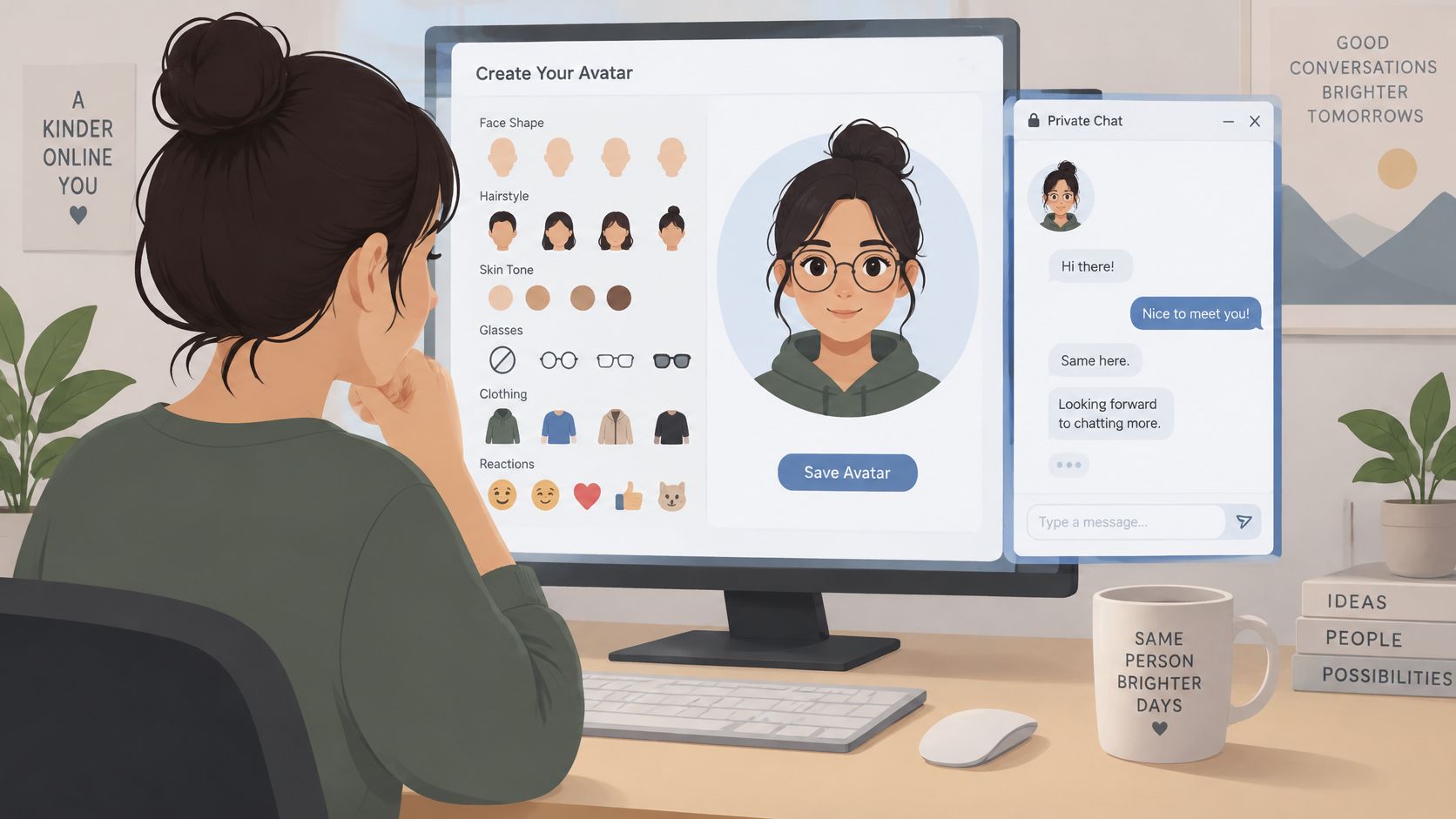
- Face and hair: Choose face shape, hairstyle, and skin tone without aiming for a deceptive photographic copy.
- Personal style: Use glasses and clothing to establish a recognizable aesthetic.
- Reactions: Choose expressive reaction images that suit the persona's tone.
- No likeness required: An original character can skip real-person photos entirely.
Use a calm first-chat script
Persona creation continues in our mobile-first flow. Before typing, confirm that the AI label is visible from the first screen, then return to your boundaries and approvals if anything feels ambiguous.
Begin with something easy to judge: ask for a casual greeting, a brief draft, or a reference to an authorized shared joke. Read the source cue on each response and check both the wording and the underlying claim.
The NIST AI Risk Management Framework materials identify transparency as a trustworthiness consideration, including during human-AI interaction. In practice, disclosure should remain visible while the language becomes familiar, not disappear after setup.
For a visual companion to the setup, you can watch this video.
Set a stop rule before a longer conversation
In Talk, selected context can carry forward. Stop and pause if the persona invents a life event, breaches a boundary, or starts to feel like an actual person rather than generated conversation.
Keep real-person and memory chats private, not in public discovery or posts that could mislead others about authorship. A familiar response isn't permission to publish someone's private history.
For memorial use, go slowly. Authorized stories can support reflection, but the chat isn't contact with the person who died and isn't a substitute for grief support or therapy. If using it leaves you feeling worse, pause and reach out to someone you trust or a qualified professional.
Familiar wording is a style match, not a presence.
Questions to Settle Before You Create One
Can other people see a realistic persona?
Keep realistic and memory personas private; they shouldn't appear in public discovery or search, and sharing is limited by our consent policy. Don't present a generated exchange as something the living person wrote or endorsed.
What if a reply hurts or is simply wrong?
Treat it as a probabilistic draft, not a person's judgment or a therapist's advice. Inspect the source cue, correct or remove the relevant memory, and pause or delete the chat if continuing doesn't feel useful.
Does deleting the export wipe everything?
Not by itself, because the original upload, later conversations, and derived memories are distinct categories. Use the memory controls to remove the relevant retained context, then retest rather than taking a missing file as proof that every related detail is gone.
Can I start with history from just one app?
Yes, start with permitted material from the app that best represents the voice and context you want, rather than adding unrelated archives for volume. The guide to an AI version of a person gives you the general path if you're still deciding what to build.
Before starting, check that your purpose is clear, permissions are recorded, and you know how to stop or change the conversation. You can review plans and pricing separately without rushing those decisions.
ExChat offers private, clearly labeled AI personas shaped by messages, memories, and relationship context you're permitted to use. When you're ready, visit ExChat to define a voice, review its sources and boundaries, and create a persona at your own pace.
Create a private, clearly labeled AI persona from conversations you are allowed to use.
Create a persona ↗